Spiral Engineering App for iPhone
Keep Every Device
at Peak Performance
Spiral Engineering is the service app for Keilton+autani systems. Installers and service technicians use it on site to upgrade device firmware over Bluetooth and fine-tune light output, one device at a time or across an entire zone.
What It’s For
A Service Tool for the People Who Keep Systems Running
The Keilton+autani app commissions and controls your lighting every day. Spiral Engineering handles the engineering work behind it: installing new firmware when features or fixes are released, and adjusting how each luminaire dims and responds.
Spiral Engineering
Upgrade and tune
- Install firmware on one device or a full firmware group
- Set top, low-end and bottom trim, PWM frequency and transition time
- Check firmware builds and signal strength across a site
- For installers, service technicians and site administrators with management privilege
Keilton+autani App
Commission and control
- Create zones, groups and scenes
- Add devices and set sensor behavior
- Run schedules and day-to-day lighting control
- For contractors, facility teams and building occupants
Features
Everything You Need for On-Site Service
Firmware Upgrade
Single-Device Upgrade
Update one device over Bluetooth in about 90 sec. The device reboots and the app confirms the new build.
Mesh OTA
Upgrade every device of one firmware type in a single 20-30 min pass. Devices relay the update to each other across the mesh.
Batch Upgrade
Tap All to select every device that is behind on firmware. The app updates them one after another.
New Firmware Alerts
The app tells you when a new build is available, so you arrive on site with the right version.
Parameter Setting and Site Tools
Trim Settings
Set Top Trim, Low-end Trim and Bottom Trim for a single luminaire or a whole group.
PWM Frequency and Transition Time
Adjust PWM frequency and fade timing to match the driver and the application.
Zones, Light Info and Nearby Lights
See every device’s firmware type, current build and signal strength before you start.
Force Sync
Push the current zone settings to devices when they need to be brought back in line.
See the App
Clear Screens for Field Work
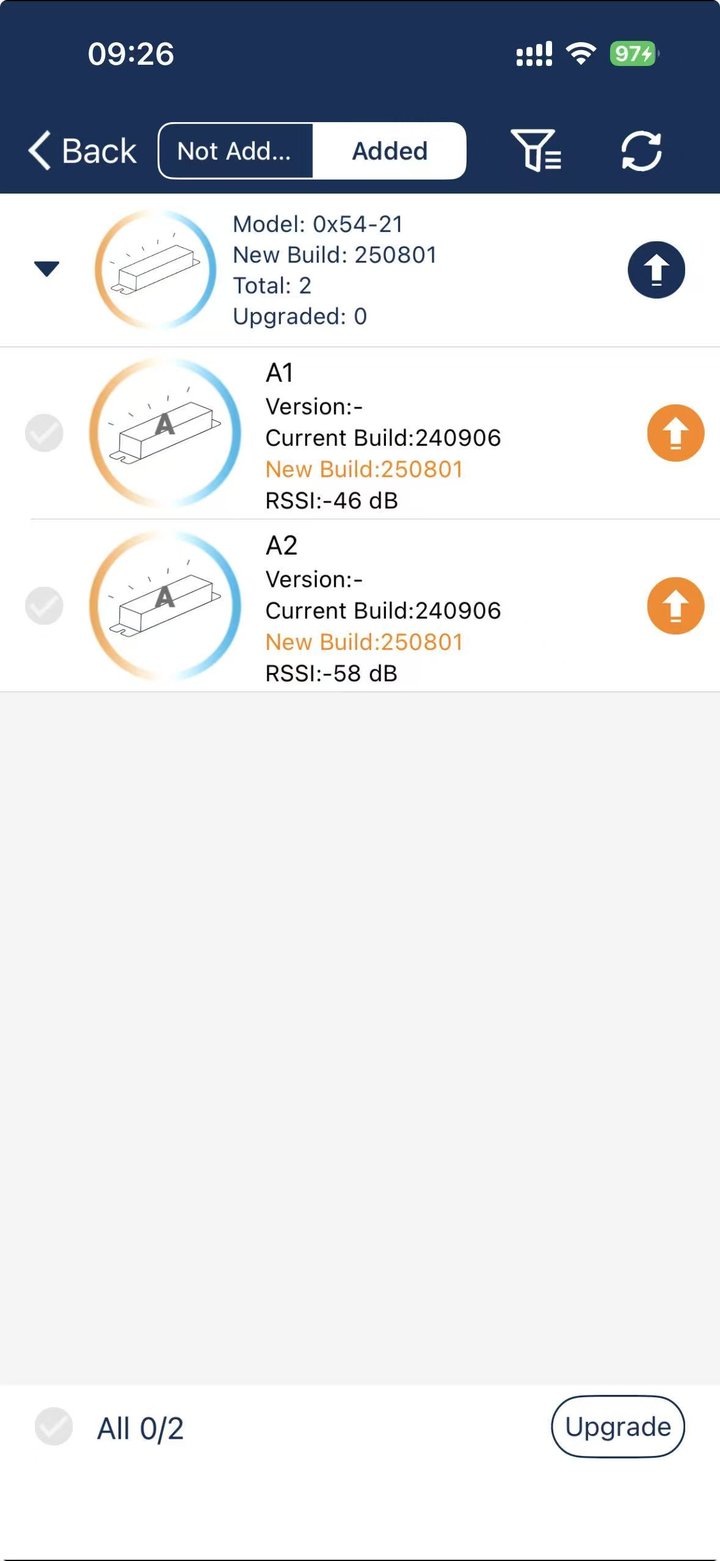
Devices are grouped by firmware type, with current and new builds side by side.
Light Upgrade
Devices grouped by firmware type, with current build, new build and signal strength.
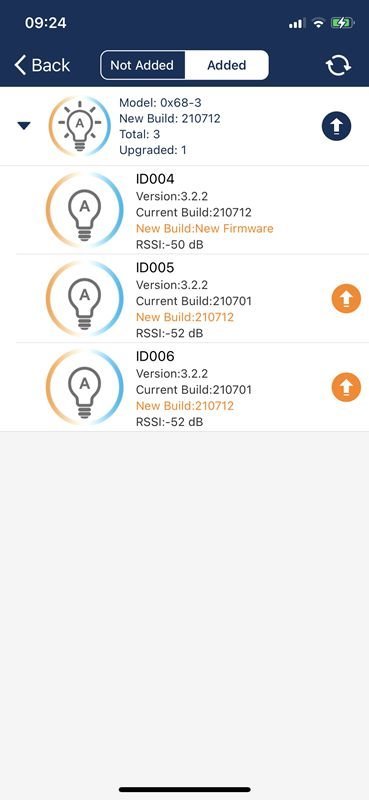
Single-Device Upgrade
Tap the orange button to update one device in about 90 sec.
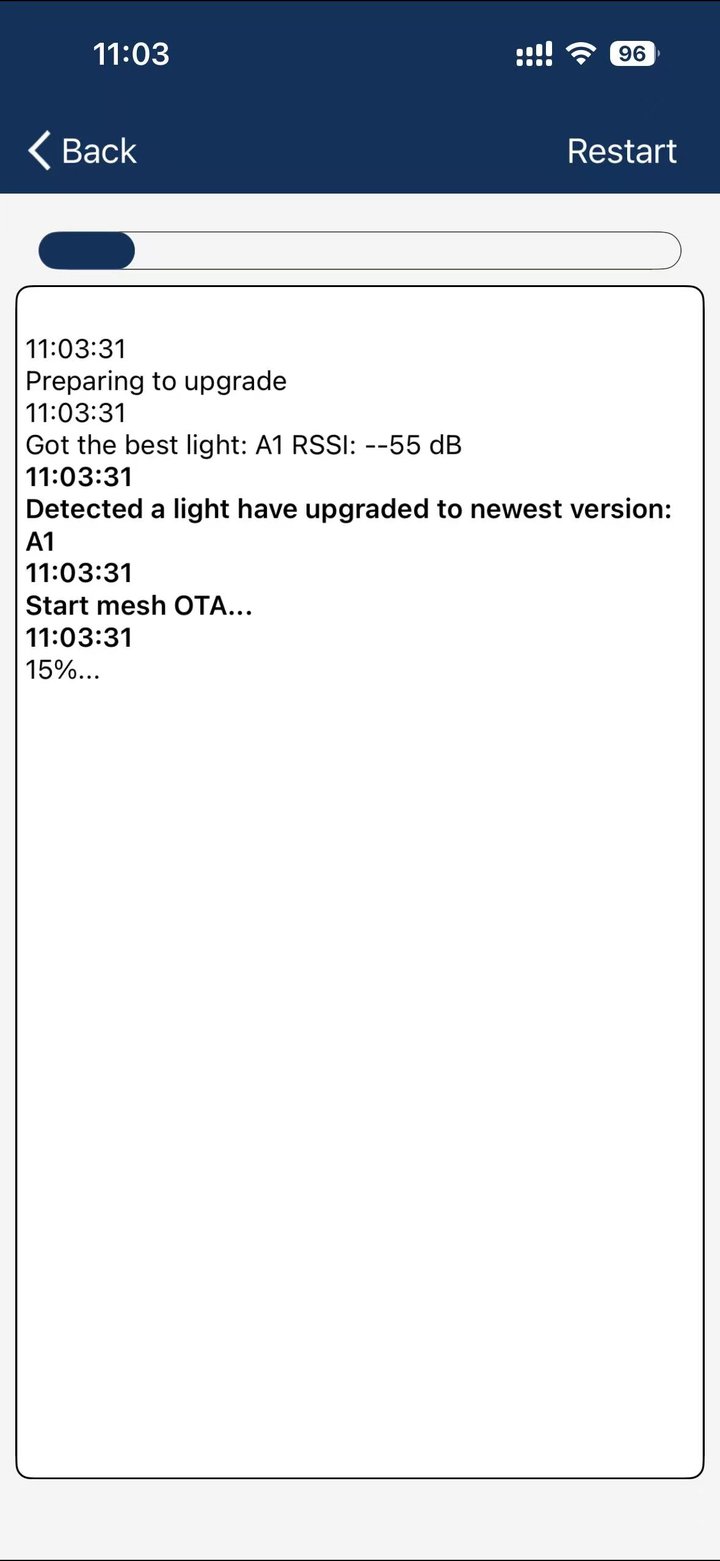
Mesh OTA
Tap the blue button, then follow progress as the update spreads across the zone.
How It Works
Ready on Site in Three Steps
-
Install and update
Download Spiral Engineering on your iPhone. Update to the latest version before each site visit.
-
Scan the zone QR code
Open My Zones and scan the zone’s QR code with your camera or from a saved image. This grants management access.
-
Upgrade or tune
Choose Light Upgrade to install firmware, or Parameter Setting to adjust trim and dimming. Stay near the devices and keep your phone still.
Plan Your Visit
Choose the Right Upgrade Method
Single-device upgrades are fastest for small jobs. Mesh OTA takes the same time whether you have 20 devices or 50.
| Devices | Single-device upgrade | Mesh OTA |
|---|---|---|
| 1 | 90 sec | 20-30 min |
| 6 | About 9 min | 20-30 min |
| 12 | About 18 min | 20-30 min |
| 20 | About 30 min | 20-30 min |
| 50 | About 75 min | 20-30 min |
Rule of thumb: use single-device upgrade for fewer than 20 devices of one firmware type. Use Mesh OTA for 20 or more. For large sites, signal boosters and the RP1 and FL30 tools extend Mesh OTA coverage area by area.
Requirements
- iPhone with iOS 12.0 or later
- Management privilege for the zone, granted by scanning its QR code
- Bluetooth and network permissions allowed when prompted
- Latest app version installed before each visit
- Same mesh network and firmware type for every device in a Mesh OTA pass
FAQ
Common Questions
Do I need to install every new firmware build?
No. If your devices are working properly, you do not need the latest build. Install new firmware when you want a new feature, need a fix, or are notified by our team.
Is Spiral Engineering available on Android or iPad?
Spiral Engineering is available for iPhone only. The Keilton+autani app for everyday commissioning and control is available on Android, iOS and iPadOS.
What happens if the connection drops during an upgrade?
For a single-device upgrade, move closer to the device and start again. For Mesh OTA, the devices keep updating. Reopen the app and return to the Mesh OTA screen to see their actual progress.
Does the app collect personal data?
No. Spiral Engineering does not collect personal data.
Get the App
Download Spiral Engineering
Spiral Engineering is free. Scan the QR code with your iPhone camera, or download it from the App Store.
Spiral Engineering for iOS
Free on the App Store for iPhone with iOS 12.0 or later.
Download on the App Store
Scan with your iPhone camera
Spiral Engineering is developed and supported by LiteTrace Brands, a USA-based company headquartered in Columbia, MD.
Documents